
Read This First
Before we talk about tools, scripts, or Viral Character — you need to understand where the dollars come from.
People are already making real money posting simple, repeatable, informational comedy videos using split-screen character explainers. Two animated characters debate a topic. One teaches. One reacts. Viewers learn something and share it.
Here's how the money stacks up:
- Facebook: pays creators from Day 1. No follower minimum. Post consistently → earn immediately.
- YouTube Shorts: once you cross ~10M views (very achievable with these formats), you unlock pay-per-view revenue.
- Instagram: offers performance bonuses (e.g. $2,000 for posting 30 times in a month once your page grows).
- Brand deals: the real money. Companies will pay $500–$3,000 per video just to get in front of your audience.
Accounts in the algorithms, side hustles, and finance niches are printing because:
- Their content teaches
- Their audience trusts them
- Their niche converts into dollars
You are not trying to be an influencer. You are building a media asset. Once you understand that, everything else becomes mechanical.
Step 1: Pick a Niche That Prints
Your goal is not originality. Your goal is clarity + demand.
Pick ONE niche and stay in it.
Here are 20 high-learning, high-attention niches you can start with:
- Making money online
- Credit cards & credit score hacks
- Algorithms / social media growth
- AI tools & automation
- Side hustles for beginners
- Real estate basics
- Crypto & Web3 (education only)
- E-commerce & dropshipping
- Career advice & resumes
- College survival & shortcuts
- Productivity & focus
- Fitness myths & fat loss
- Nutrition & supplements
- Tech startups & apps
- Investing for beginners
- Sales psychology
- Marketing & ads
- Freelancing & solopreneur life
- Internet scams & warnings
- Business stories & failures
Rule: If people don't know something and want to know, it works.
Step 2: Start With One Video Idea
Don't open five tabs and overthink this. Pick one idea in your niche.
Examples that work:
- "3 credit score mistakes keeping you under 700"
- "Why the Instagram algorithm hates reposts"
- "The laziest side hustle that actually pays in 2026"
- "What nobody tells you about dropshipping margins"
You don't need 50 ideas on day one. You need one clear hook that makes someone stop scrolling.
Inside Viral Character, you'll turn that hook into a full script in the next step — no external tools required.
Step 3: Create Your Video in Viral Character
This is the mechanical part. Viral Character walks you through five studio steps: Intake → Cast → Script → Studio → Render.
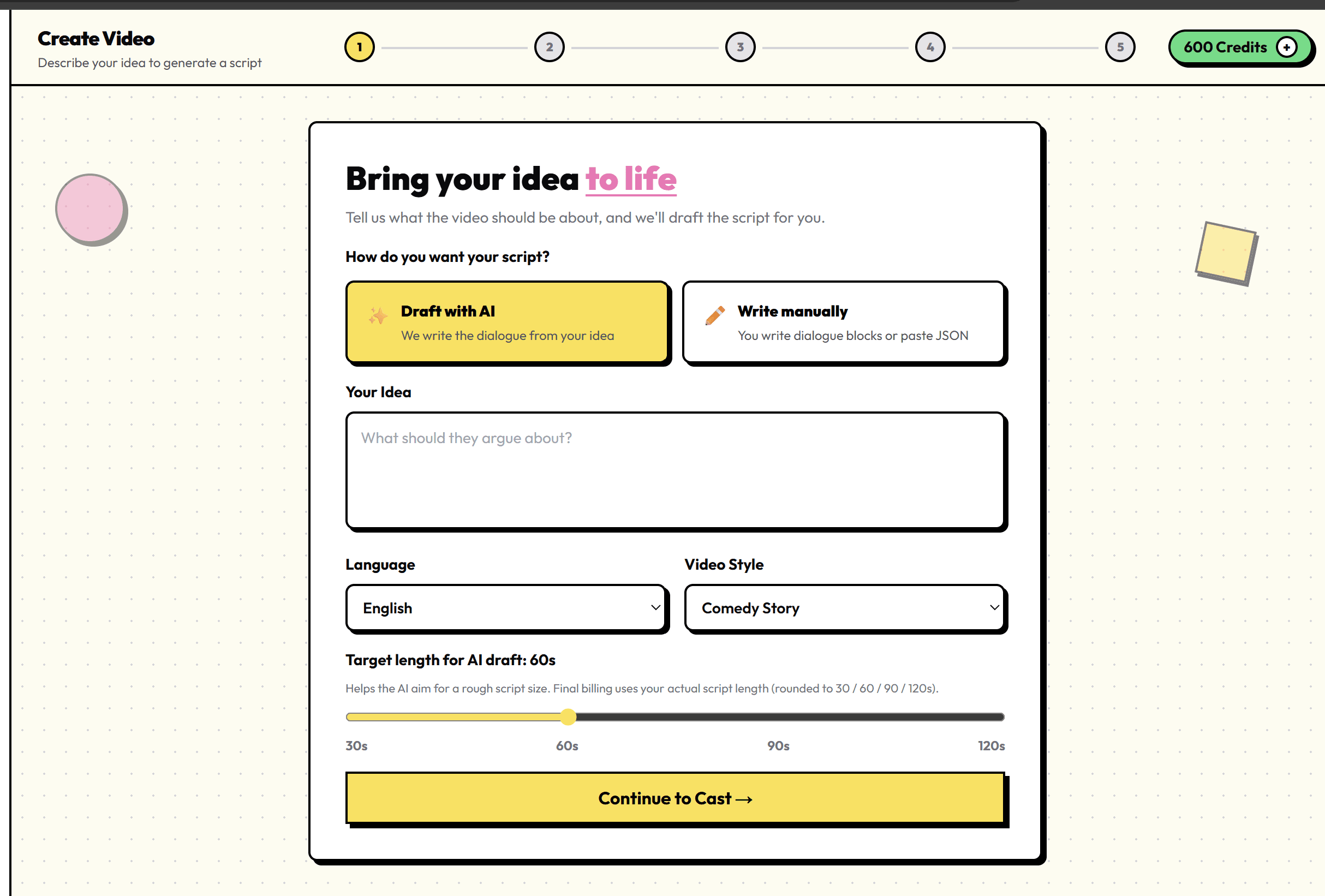
3a. Intake — Drop Your Idea
- Go to Create Video (sign up free if you haven't yet).
- Select Draft with AI — we write the dialogue from your idea.
- Paste your hook into Your Idea (e.g. "Explain 3 credit score mistakes keeping people under 700").
- Choose your Language and Video Style (Educational, Comedy Story, or Brain Rot).
- Set Target length to 60 seconds for your first video.
- Click Continue to Cast →
Free trial: You get 100 credits on signup — enough for one 60-second video using platform characters. No credit card required.
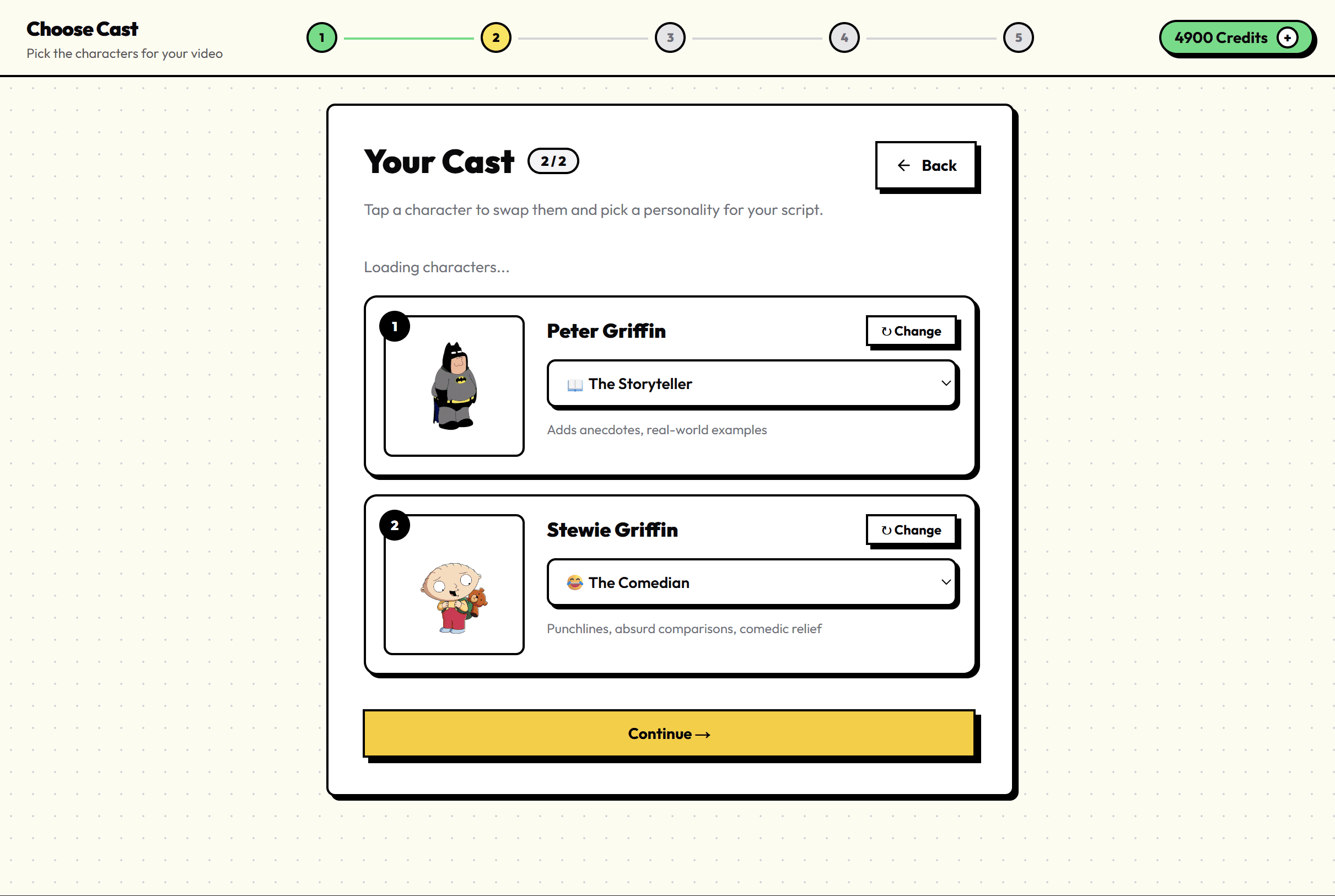
3b. Cast — Pick Your Two Characters
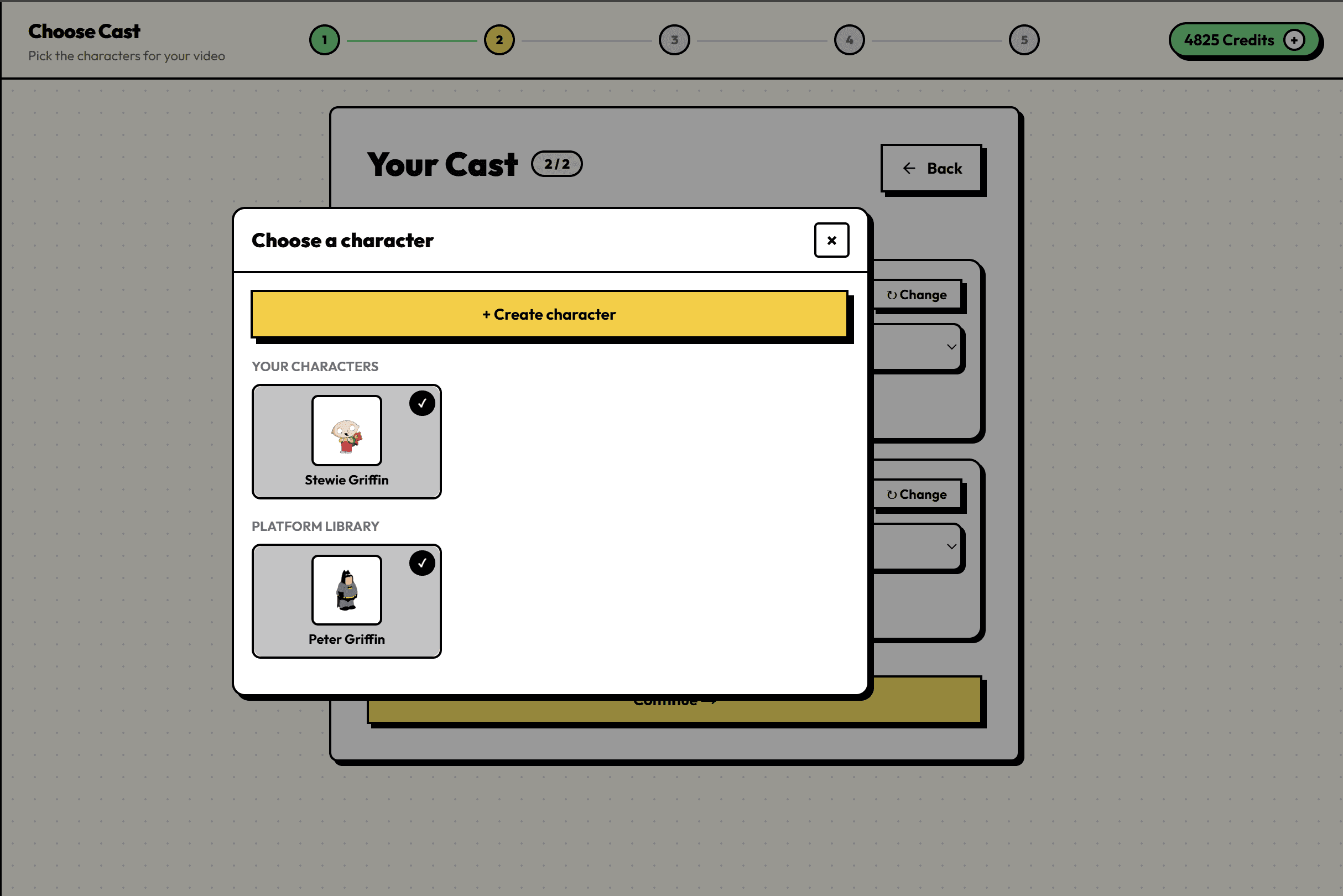
- On the Your Cast screen, pick two characters from the platform library.
- Assign a personality to each (e.g. The Authority + The Naive Beginner).
- Click Continue → — the AI drafts your script automatically.
Want custom characters? Subscribe to any paid plan (Starter, Pro, or Agency) to create your own characters with uploaded artwork and custom voices. Upload once, apply to every line that character speaks.
3c. Script — Review & Approve
- You'll land on Your Script with a full AI draft.
- Edit any dialogue block — trim fluff, sharpen the hook, add a punchline.
- Make sure the last line includes a follow CTA (e.g. "Follow for part two").
- Click Approve & Go to Studio →
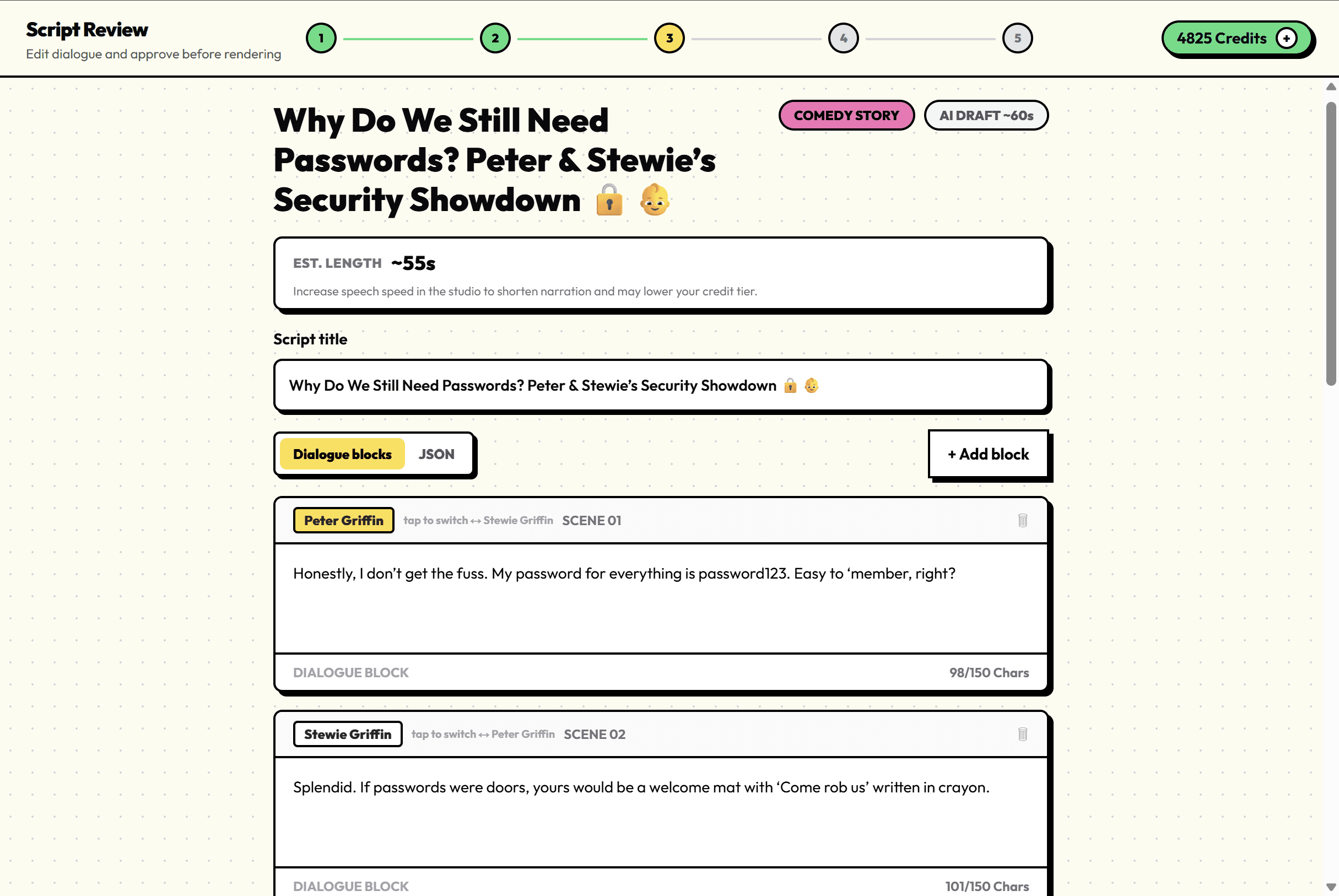
Manual option: Prefer full control? On Intake, choose Write manually instead of Draft with AI. You can paste JSON dialogue or type blocks yourself.
Skip the guesswork — build it inside Viral Character
Follow the steps above in the studio. Your first video is one signup away.
Start Free Trial3d. Studio — Make It Look Viral
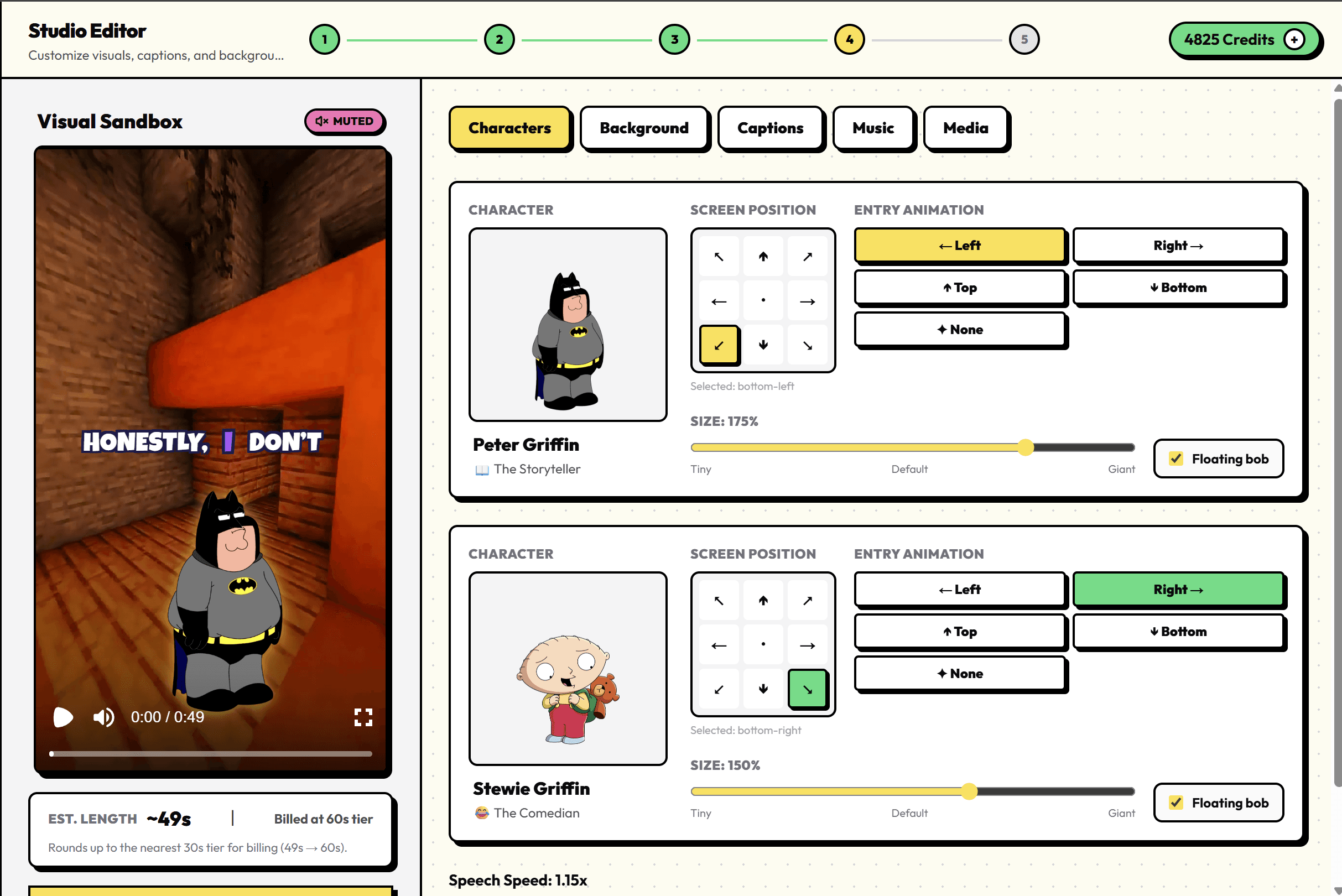
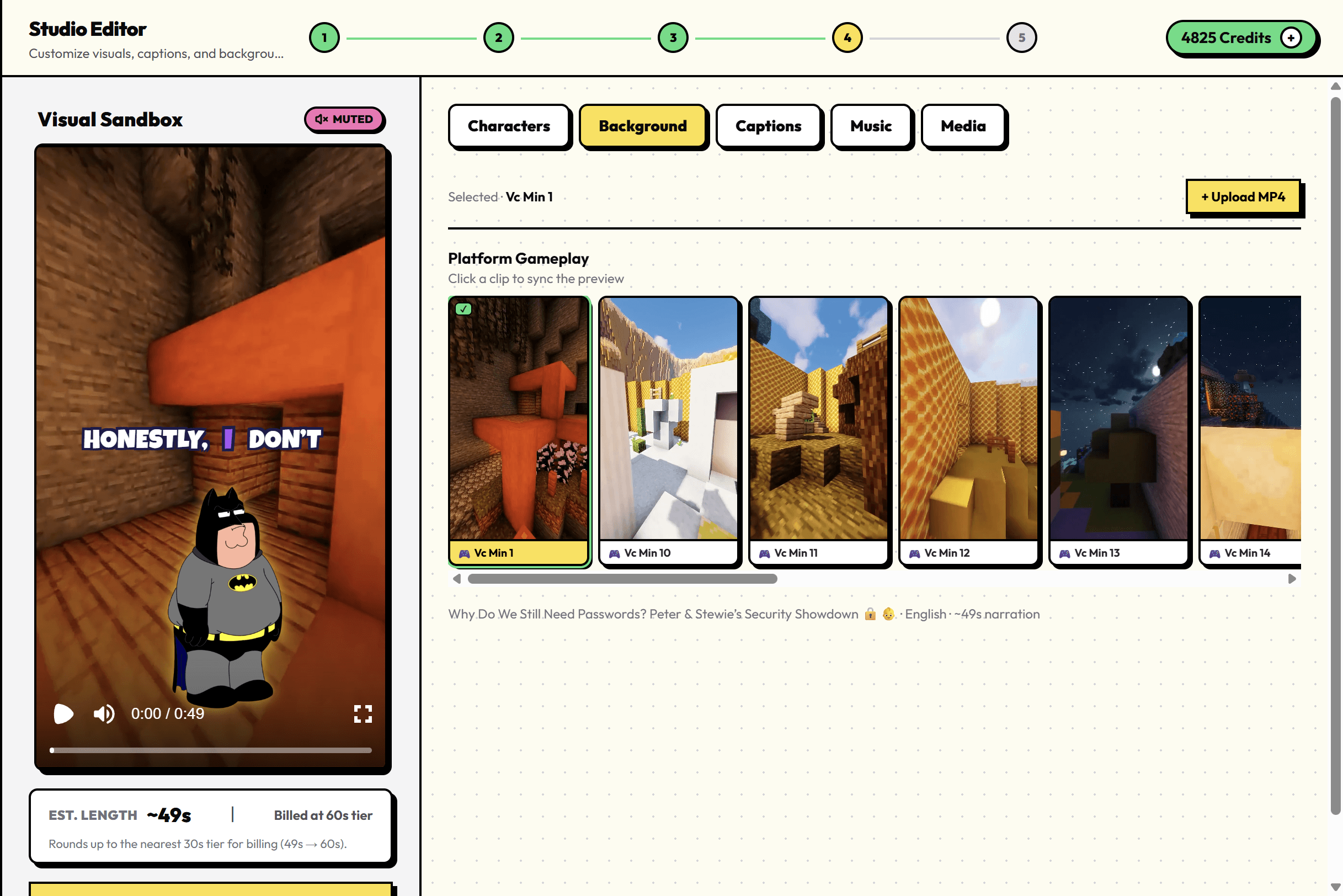
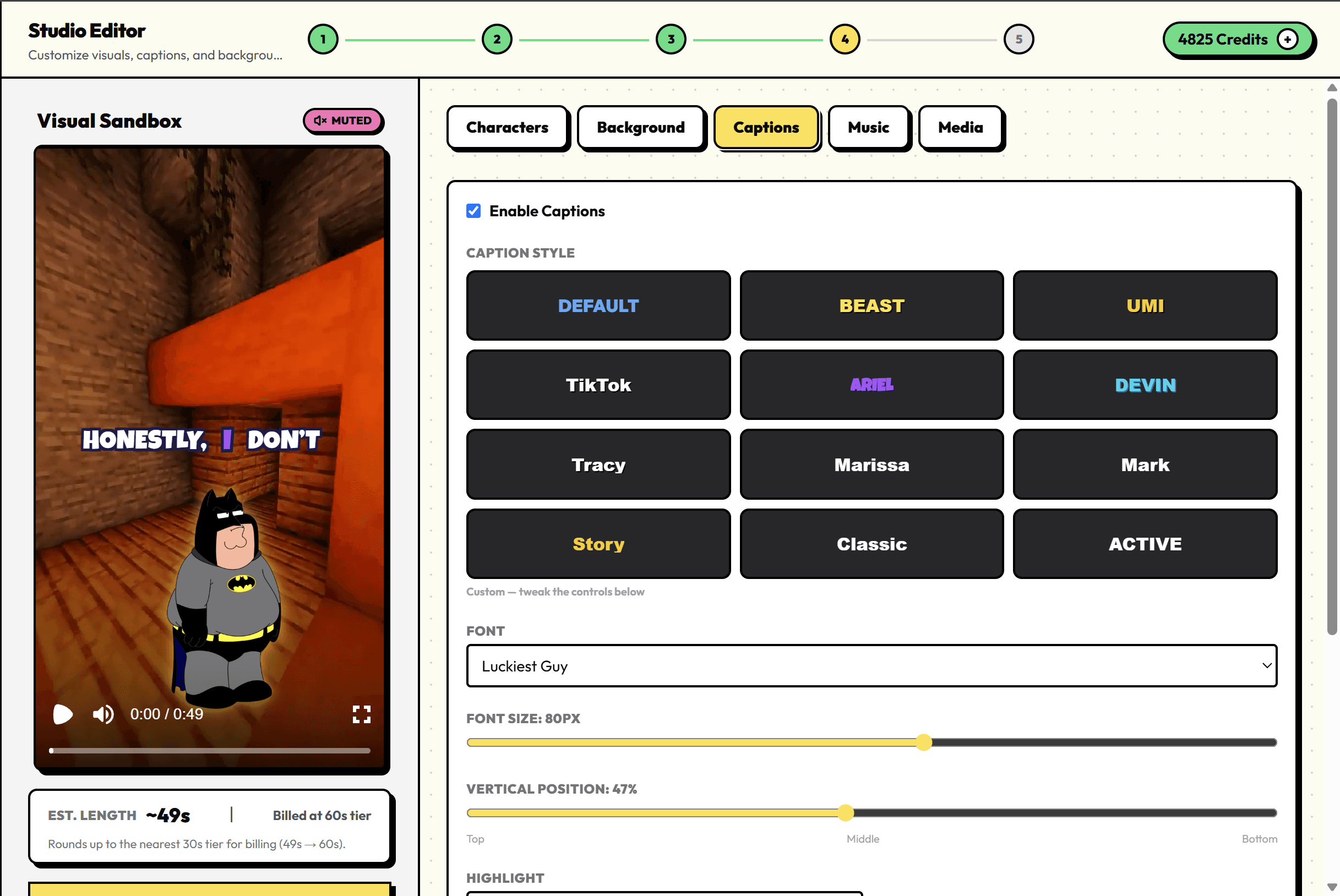
The Visual Sandbox shows a live preview as you edit.
Characters tab
- Set Screen Position (left/right/top/bottom entry).
- Adjust Size and toggle Floating bob for energy.
- Tune Speech Speed if lines feel rushed.
Background tab
- Pick Platform Gameplay footage (built-in library) or upload your own MP4.
Captions tab
- Enable captions — most Shorts/Reels viewers watch muted.
- Pick a Caption Style preset and position (bottom-third works best).
Music tab
- Add a background track that matches your niche energy.
Media tab
- Drop B-roll or overlays if you want extra visual punch.
3e. Render — Generate & Download
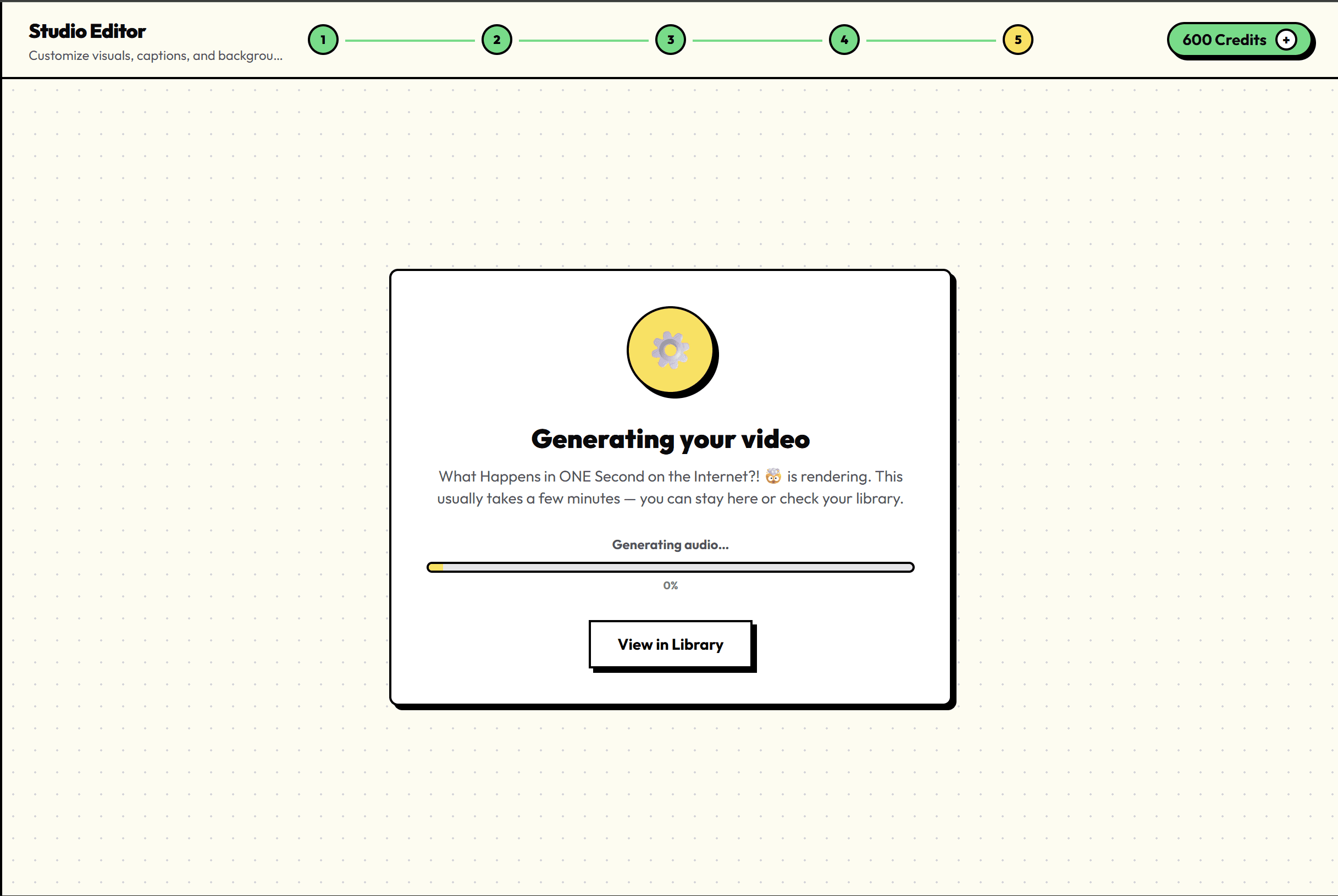
- Click GENERATE FINAL VIDEO · 50 CREDITS (60s tier).
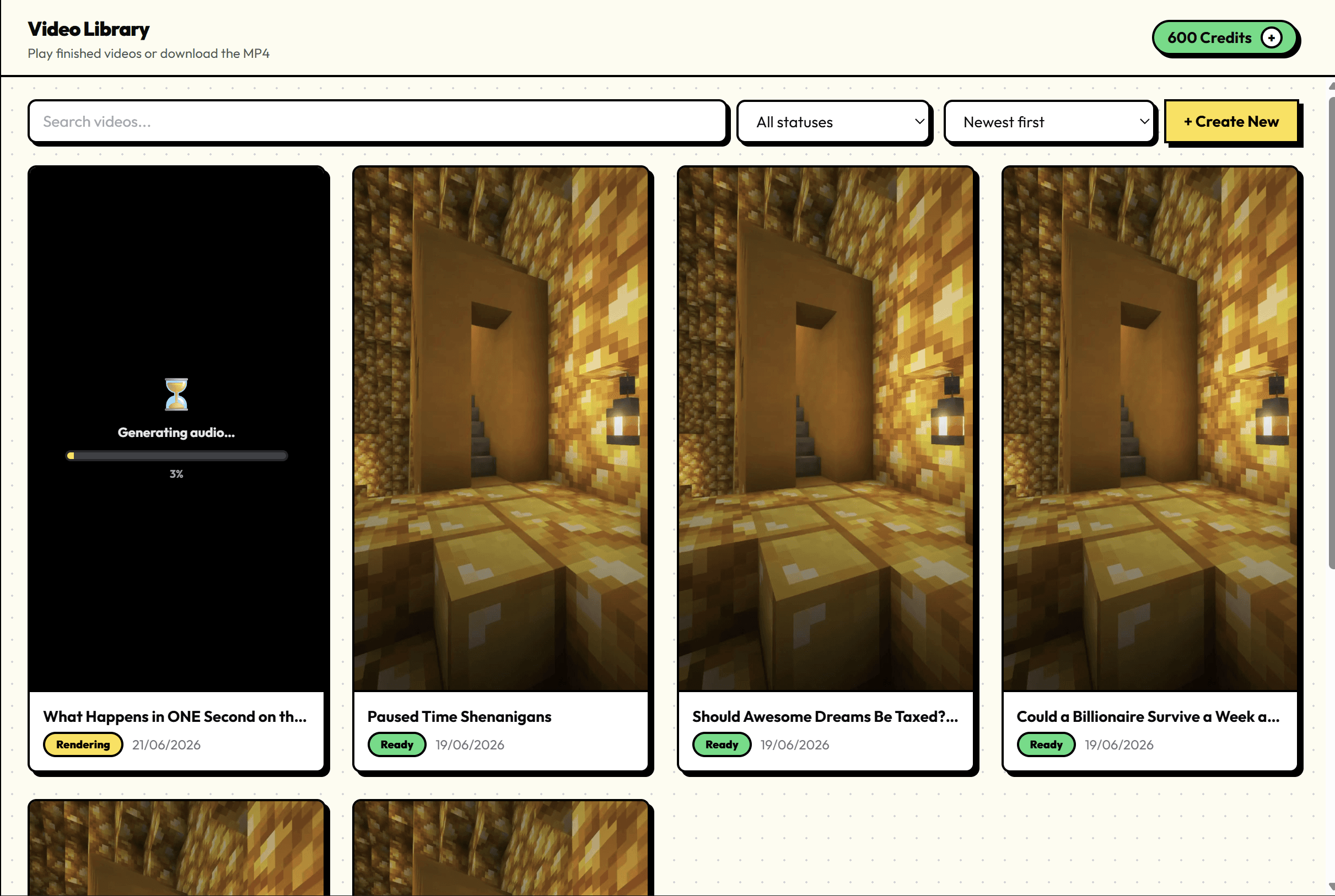
- Wait ~2–3 minutes while we render audio, animation, captions, and export.
- When you see Video ready!, open Library and download your MP4.
- Post it. That's it.
Step 4: Level Up With Custom Characters (Optional)
Platform characters are perfect for your first video. When you're ready to stand out:
- Open + Create Character from the Cast screen.
- Walk through Basics → Personality → Voice → Image → Preview.
- Upload a character image (PNG or JPG).
- Apply it to all messages for that character in one click.
Paid plans start at $9/mo (Starter) with 1,500 monthly credits, custom characters, custom voices, and the full platform library. See pricing →
Step 5: Post Like a Machine
Your only job now:
- Post 3–5 videos per day
- Stay in ONE niche
- Don't delete videos — old posts resurface and compound
Consistency beats perfection. Batch your ideas on Sunday, create 5–10 videos in one sitting, schedule them across the week.
Track what hooks get saves and shares. Double down on those angles. Your second video should feel like your first — same format, same characters, new topic in the same niche.
Quick Reference: The Full Flow
| Step | Where | What you do |
|---|---|---|
| 1 | Create | Drop idea → Draft with AI → 60s |
| 2 | Cast | Pick 2 characters + personalities |
| 3 | Script | Edit dialogue → Approve |
| 4 | Studio | Background, captions, music |
| 5 | Render | Generate → Download from Library |
| 6 | Post | 3–5x/day, one niche, no deletes |
FAQ
Do I need to write scripts in ChatGPT first?
No. Viral Character generates the full dialogue from your idea. You can edit everything in the Script step.
How much does a 60s video cost?
100 credits. Free signup includes 100 credits — two videos on us.
Can I remove watermarks?
All paid plans export clean files with no watermark.
What aspect ratio?
Vertical 9:16 — ready for TikTok, Reels, Shorts, and Facebook.
How should I use this as a publishing workflow?
Treat it as a daily production job: pick one niche, post consistently, and review every video before you publish. Results vary by niche, quality, and distribution.
Ready to create your first viral explainer?
Turn one niche idea into a finished vertical video — AI script, dual characters, captions, and export in minutes.
Start Free Trial